Presenting “Object Persistence in C#” at Bay.NET User Group on April 9th, 2015

I will be presenting “Object Persistence in C#” at the Bay.NET user group at the Berkeley City College located at Room 451A, 2050 Center Street, Berkeley, CA from 6:15 pm – 9:00 pm.

Deborah Kurata, Co-Organizer, East Bay Chapter Leader, was kind enough in helping to get this organized. Thank you Deborah.

I will see you there.

Object Persistence, Part 5 – Video – Redis Provider

In part 4 of this series, I went through the entire Visual Studio solution and also showed the db4o object database provider.

In part 5, I’ll show you how to store your Plan Old C# Objects (POCO) into Redis using the Redis Cloud at redislabs.com service. We will build the Redis Provider and take it out for a spin storing our new domain objects.

You can download the source code at GitHub.

Object Persistence, Part 4 – Video

In part 3 of my Object Persistence series, I introduced the complete Visual Studio 2012 source code.

This is part 4 of my Object Persistence series. I created a detailed video that goes thru all the parts in the solution. Enjoy! Make sure you continue with part 5 where we build a Redis persistence provider.

Watch the video walkthrough on my YouTube channel:

Object Persistence, Part 3 – Source Code

In part 2 of my Object Persistence series, I’ve touched on the issues that still exist today.

In part 3, I’ve published a complete sample Visual Studio 2012 solution on GitHub that demonstrates object persistence using a db4o persistence provider. Over time, I will add additional sample persistence providers for Redis, SQL Server, and possibly a NoSQL provider such as SimpleDB (one of Amazon’s great NoSQL databases).

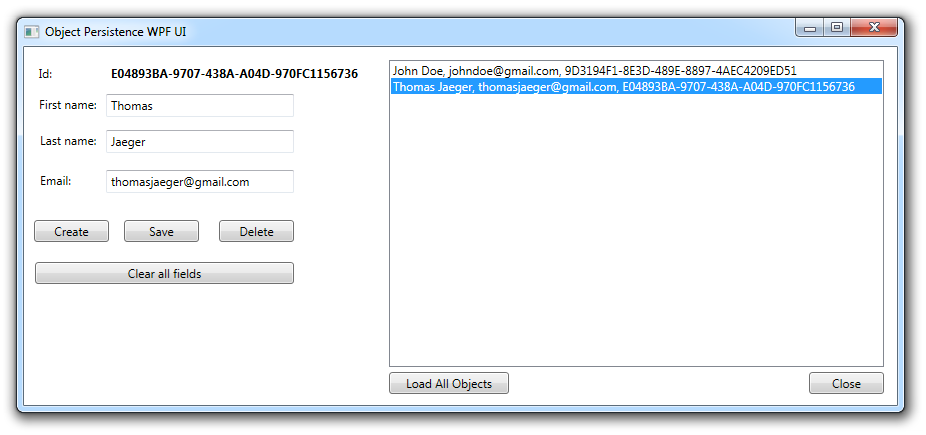
This sample solution includes complete server side and client side layers. The Server side runs as a REST based Web API 2 service. The server portion also includes a simple domain model and, of course, the persistence provider and how it is implemented. I will update the solution over time, expand the domain model, UI, etc. as required.

The client side is a WPF application that consumes the REST service. The payload to and from the REST service is via JSON objects.

ObjectPersistencePart3_WPF

I hope you like it. You can use this sample solution as a template to start simple or very complex software solutions. This solution can easily be taken and split across different nodes in a cluster of Amazon AWS EC2 instances, for example. However, for a cloud based solution, your persistence would have to support certain features. I will go into details when I add the Redis persistence provider.

Instead of writing a very long blog post, I will post a screen cast video and go through the solution. I think this will make more sense and you have a chance to go through the source code with me. So, go ahead and get the latest version from GitHub and start playing with it.

How to turn on Long Polling on an AWS SQS Queue

The following code snippet will allow you to configure an AWS SQS queue for long polling using the ReceiveMessageWaitTimeSeconds attribute. For more information about Amazon long polling, see here:

http://docs.aws.amazon.com/AWSSimpleQueueService/latest/SQSDeveloperGuide/sqs-long-polling.html

// 5. Set Queue attributes
// The API Version 2012-11-05 of Amazon SQS provides support for long polling. (.net sdk v2)
// In the AWS console, you can verify in "Receive Message Wait Time" value of the queue
SetQueueAttributesRequest setQueueAttributesRequest = new SetQueueAttributesRequest();
List<Amazon.SQS.Model.Attribute> attributes = new List<Amazon.SQS.Model.Attribute>();
Amazon.SQS.Model.Attribute attribute = new Amazon.SQS.Model.Attribute();
attribute.Name = "ReceiveMessageWaitTimeSeconds";
attribute.Value = "20"; // 0 to 20 Seconds, default is 0
attributes.Add(attribute);
setQueueAttributesRequest.QueueUrl = queueUrl;
setQueueAttributesRequest.Attribute = attributes;
_sqs.SetQueueAttributes(setQueueAttributesRequest);

How to create an Amazon AWS SNS Topic and an SQS Queue that subscribes to it

Creating powerful cloud-based systems in C# and the .Net framework are possible for a long time now. Architecting a messages based cloud-computing solution that can handle millions of requests per day is not an easy undertaking but much easier when you use Amazon AWS services.

I recently needed to create an Amazon AWS SQS queue programmatically that subscribes to an SNS Topic that was also created programmatically. I could not find any examples in C# so I decided to post this code from one of my cloud-computing systems that I had designed and hope others find it useful. This particular code was used to test the dynamic nature of a messages based backend that can expand and contract the number of SQS queues based on how many active EC2 instances (nodes) in the cluster are available.

This code also shows how to create a policy for the SQS queue so that it will receive the messages from the SNS service. If you do not set a correct policy, the queue won’t receive any messages nor any exceptions are thrown.

Declaration code:

        private AmazonSimpleNotificationServiceClient _sns;
        private const string SNS_TOPIC = "YourTopicHere";
        private string _AWSSNSArn;

Core C# code:

            // 1. Create an Amazon SNS topic
            AmazonSimpleNotificationService sns = new AmazonSimpleNotificationServiceClient(RegionEndpoint.USWest1);
            _AWSSNSArn = sns.CreateTopic(new CreateTopicRequest
            {
                Name = SNS_TOPIC
            }).CreateTopicResult.TopicArn;

            // 2. Create the Amazon SQS In-Queue, will ignore it if it already exists
            AmazonSQS sqs = AWSClientFactory.CreateAmazonSQSClient(RegionEndpoint.USWest1);
            CreateQueueRequest sqsRequest = new CreateQueueRequest();
            sqsRequest.QueueName = General.IpAddressAWSFriendly;
            string queueUrl = sqs.CreateQueue(sqsRequest).CreateQueueResult.QueueUrl;
            GetQueueAttributesRequest getQueueAttributesRequest = new GetQueueAttributesRequest();
            List list = new List();
            list.Add("QueueArn");
            getQueueAttributesRequest.AttributeName = list;
            getQueueAttributesRequest.QueueUrl = queueUrl;
            GetQueueAttributesResponse response = sqs.GetQueueAttributes(getQueueAttributesRequest);
            string queueArn = response.GetQueueAttributesResult.QueueARN;

            // 3. Configure the Amazon SNS topic to publish to the SQS queue
            sns.Subscribe(new SubscribeRequest
            {
                TopicArn = _AWSSNSArn,
                Protocol = "sqs",
                Endpoint = queueArn
            });

            // 4. Set the queue policy to allow SNS to publish messages
            ActionIdentifier[] actions = new ActionIdentifier[2];
            actions[0] = SQSActionIdentifiers.SendMessage;
            actions[1] = SQSActionIdentifiers.ReceiveMessage;
            Policy sqsPolicy = new Policy()
                .WithStatements(new Statement(Statement.StatementEffect.Allow)
                                    .WithPrincipals(Principal.AllUsers)
                                    .WithResources(new Resource(queueArn))
                                    .WithConditions(ConditionFactory.NewSourceArnCondition(_AWSSNSArn))
                                    .WithActionIdentifiers(actions));
            SetQueueAttributesRequest setQueueAttributesRequest = new SetQueueAttributesRequest();
            List attributes = new List();
            Amazon.SQS.Model.Attribute attribute = new Amazon.SQS.Model.Attribute();
            attribute.Name = "Policy";
            attribute.Value = sqsPolicy.ToJson();
            attributes.Add(attribute);
            setQueueAttributesRequest.QueueUrl = queueUrl;
            setQueueAttributesRequest.Attribute = attributes;
            sqs.SetQueueAttributes(setQueueAttributesRequest);

B7 Tool Update – Backup on Amazon S3 and 7-Zip

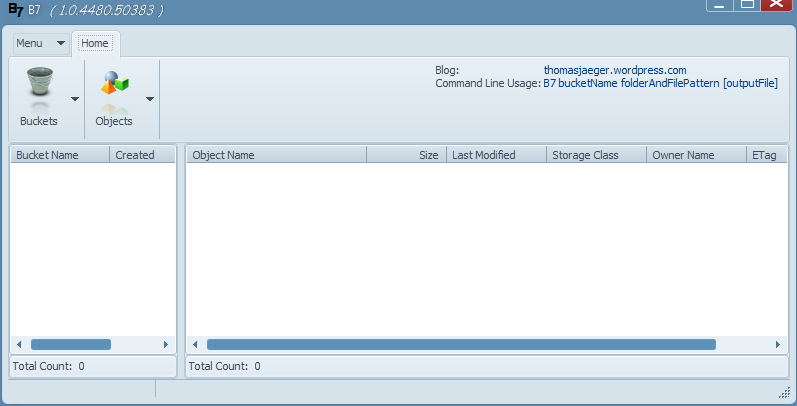
I updated my B7 tool for Amazon S3 and 7-Zip. You can now create buckets and upload files. You can still use it as a command line tool as well. I also re-did the user interface to what I believe a more user friendly version. This tool is free. Please let me know what you think.

Download B7 here.

To get started with Amazon S3 storage, click here.

B7 - Backup to Amazon S3 and 7-Zip

What is Cloud Computing?

Over the last few months I’ve been asked more and more this question: “What is Cloud Computing?” It seems the interest in cloud computing is a lot higher in 2011 when compared to last year. So, I decided to put some of my thoughts down in a series of posts and explain what I think cloud computing is all about and how you can take advantage of it. I’m very heavily involved in cloud computing and see cloud computing as the way to go despite a few hick-ups you might hear in the news.

First, let me explain my background in cloud computing. I started to explore cloud computing capabilities back in 2006 when Amazon first announced their set of Amazon Web Services (AWS). Later on, companies such as Google and Microsoft followed. The first time I heard about Amazon’s Simple Storage Service (S3), I was so excited about the possibilities. I was also excited about the cost. It is extremely inexpensive to start developing powerful cloud services and solutions.

As time went by, I explored most of Amazon’s AWS services with amazement as they were updated and new ones were released. I also briefly dabbled with Microsoft’s Azure and Google’s services; but, to this day, it is my strong believe that Amazon is the clear leader in providing the best cloud services and infrastructure in the market today. In fact, I go as far as to say that Amazon is much further ahead of Microsoft and Google combined. Amazon is the clear leader if you develop on a Microsoft stack or LAMP stack. Either way, I will try to explain a little more by what I mean in the following posts.

So, what is Cloud Computing then? From an architecture point of view, I would sum up cloud computing this way:

  1. A cloud computing solution is partitioned logically end-to-end
  2. A cloud computing solution offers an infinite storage capacity
  3. A cloud computing solution offers an infinite computing capacity
  4. A cloud computing solution can handle an infinite number of users at the same time
  5. A cloud computing solution is always available 24/7
  6. A cloud computing solution is available anywhere in the world with low latency
  7. And yes, a cloud computing solution offers certain tasks to be completed when connections are down
  8. A cloud computing solution offers multiple ways to access the information such as different devices and user interfaces (platform independent on the consuming side)
  9. A cloud computing solution expands and contracts with resources as demand increases or decreases
  10. A cloud computing solution offers very fast and native execution times on the user interfaces to provide the best user experience
  11. A cloud computing solution offers automatic backup and recovery options for consumers

These points above should be available in a modern cloud computing solution. Consider the points above the goals of a great cloud computing solution. The planning and designing of a cloud computing architecture makes the above assumptions. For example, a cloud computing solution acts like it has an infinite storage capacity available.

I’m coining the term “Cloud Computing Partitioning Pattern (CCPP)” and will explain next time what I mean by being able to partition a cloud computing solution in order to provide fast and successful operations from the time a request is received through a domain model all the way to persistence and back.

Until next time.